How Tempo Tunes works,
side A to side B
Every screen in the order you will meet it. Playlists that match your Pace.
01The walkthrough
Open the app and you land on Make. From there it is a straight line: set a tempo, pick your sound, generate, listen, save. Here is every screen in the order you meet it.
Step 1: Set your target tempo
The big number is the BPM every song aims for. 120 for a steady ride, 150 for an easy run, 174 for intervals. Step it with the buttons or drag the slider.
Training for a race, or working on your golf swing? The Tempo · Run · Golf switch at the top lets Run or Golf set this number for you.
Underneath, Tolerance sets how far a song may drift from that target. It starts at ±8, which reads as 112 to 128 BPM at a target of 120. Tighten it when the pace really matters.
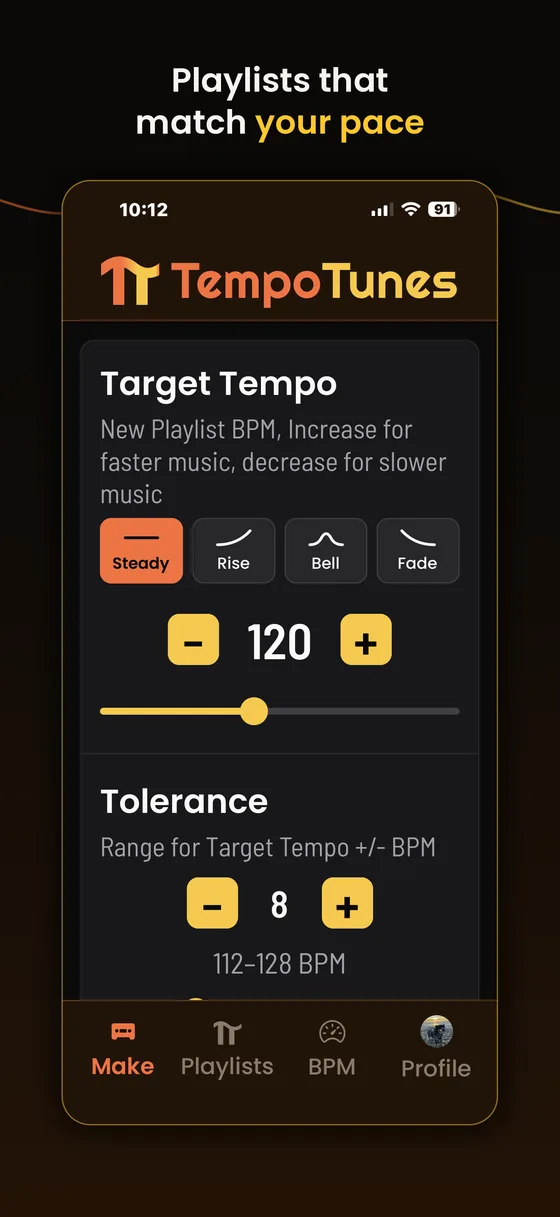
Make · Target Tempo Step 2: Or let the tempo move
Same screen, one row up. Steady holds one tempo the whole way. The other three move: Rise climbs from a start to an end, Bell builds to a peak and eases back down, Fade starts hot and lands soft.
Pick one and the single tempo becomes two, with a curve drawn between them. Tolerance still applies, now measured around the curve the whole way along. More on this in Tempo Shapes.
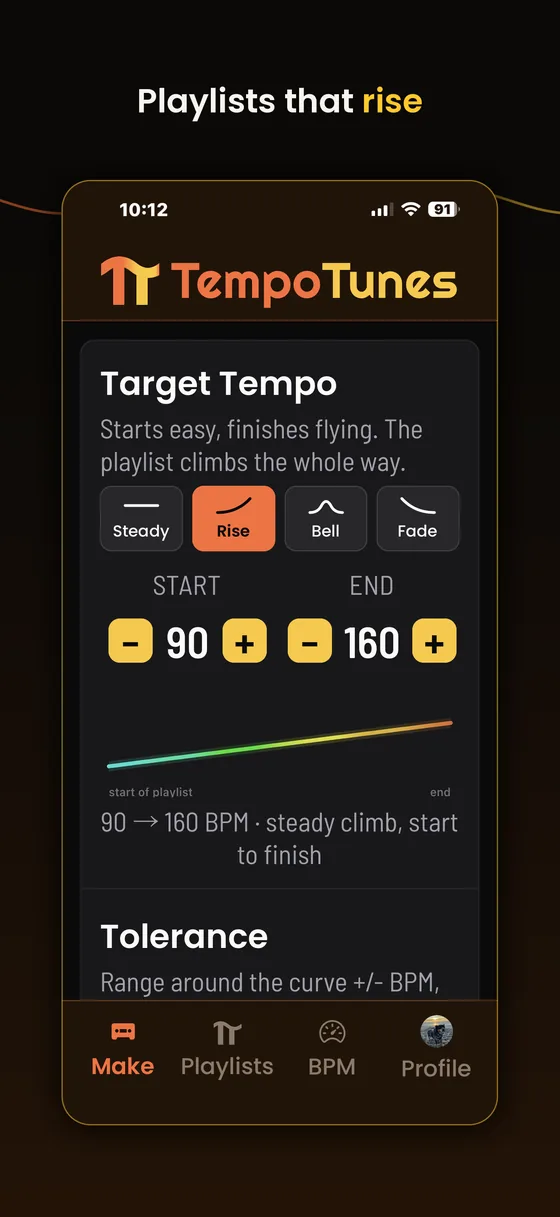
Rise · 90 → 160 BPM 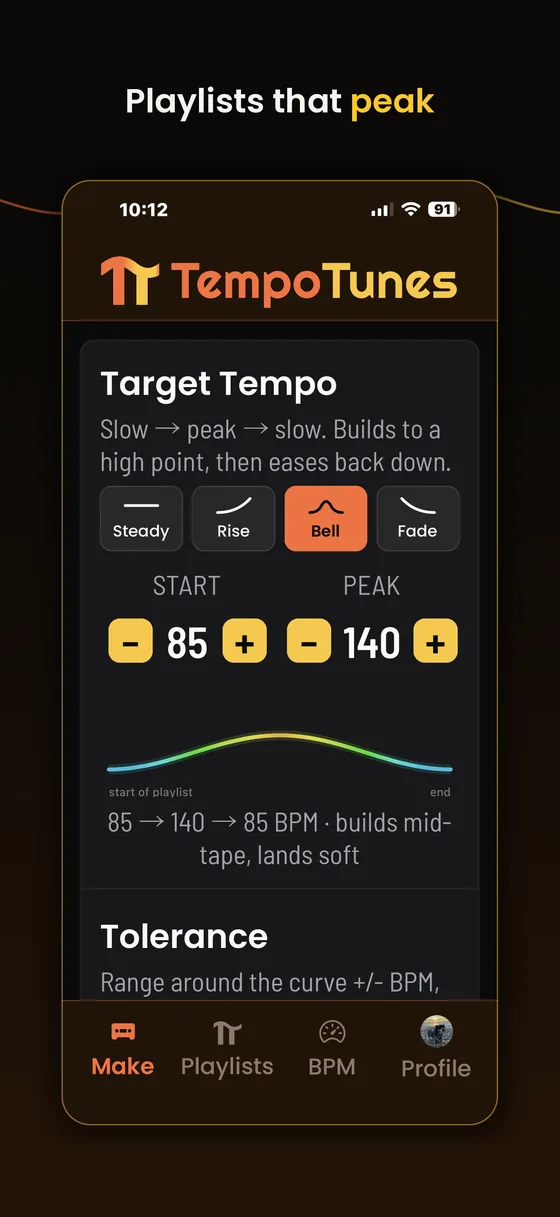
Bell · 85 → 140 → 85 BPM 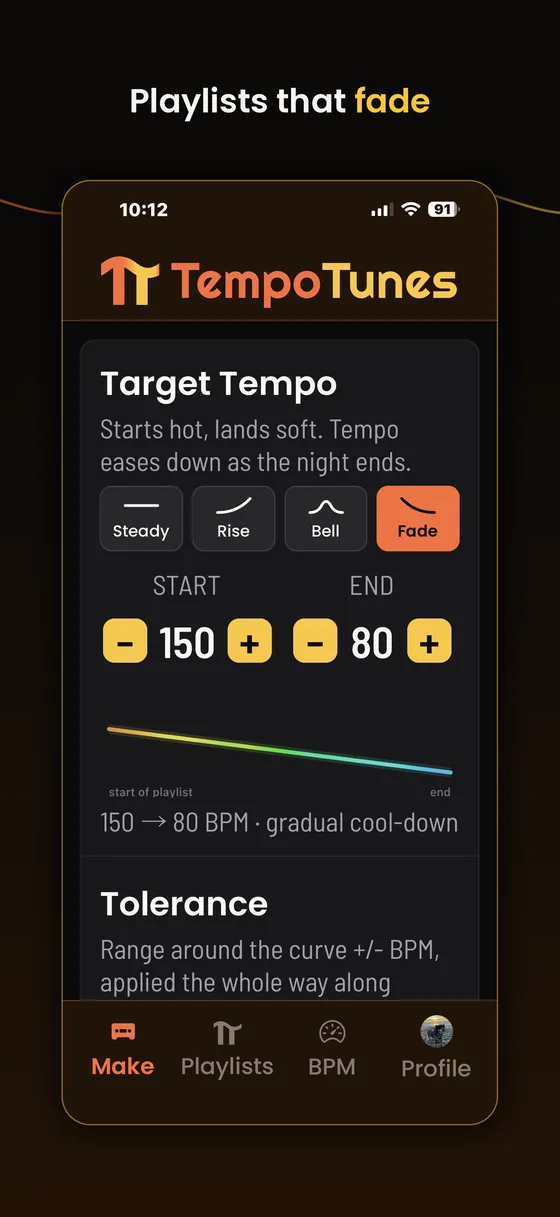
Fade · 150 → 80 BPM Step 3: Set the wiggle room and your taste
Tolerance is how far a song may drift from the target, up to ±30. On a shaped playlist the range follows the curve the whole way along, so ±8 on a 150→80 Fade covers 72 to 158 BPM across the playlist.
Below it, Obscure or Popular is the taste slider. Toward Popular you get songs people can sing along to; toward Obscure it digs up deep cuts at the same tempo. Center blends both.
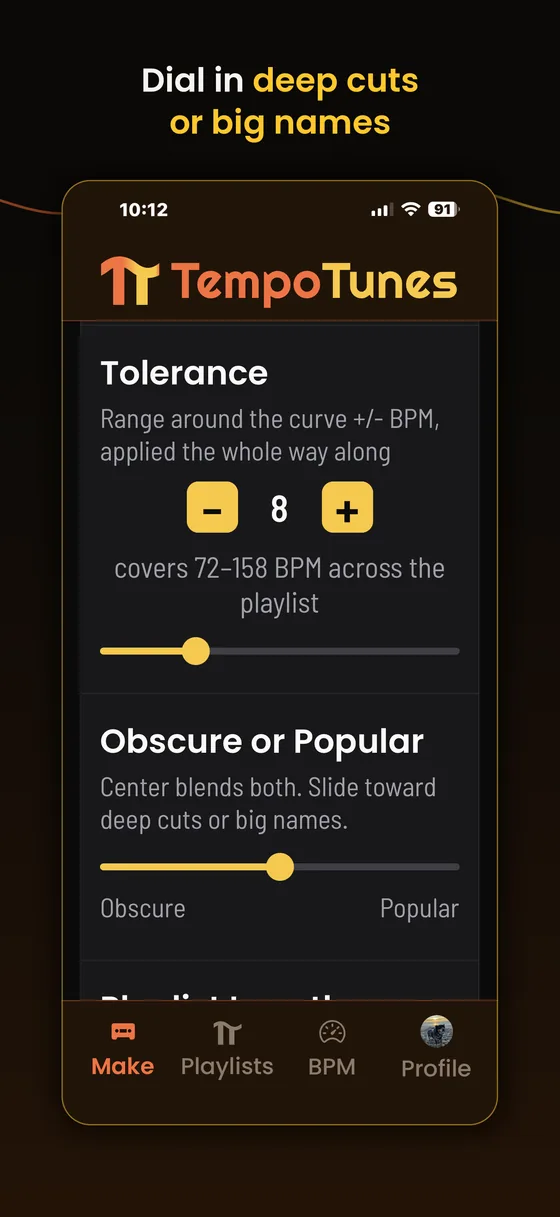
Make · Tolerance and taste Step 4: Pick how long it runs
Playlist Length works cassette style: C60 holds 15 songs, C90 holds 22, C120 holds 30, and C180 holds 50. Shorter playlists save faster.
Right below it, Musical preference starts, which is the next stop.
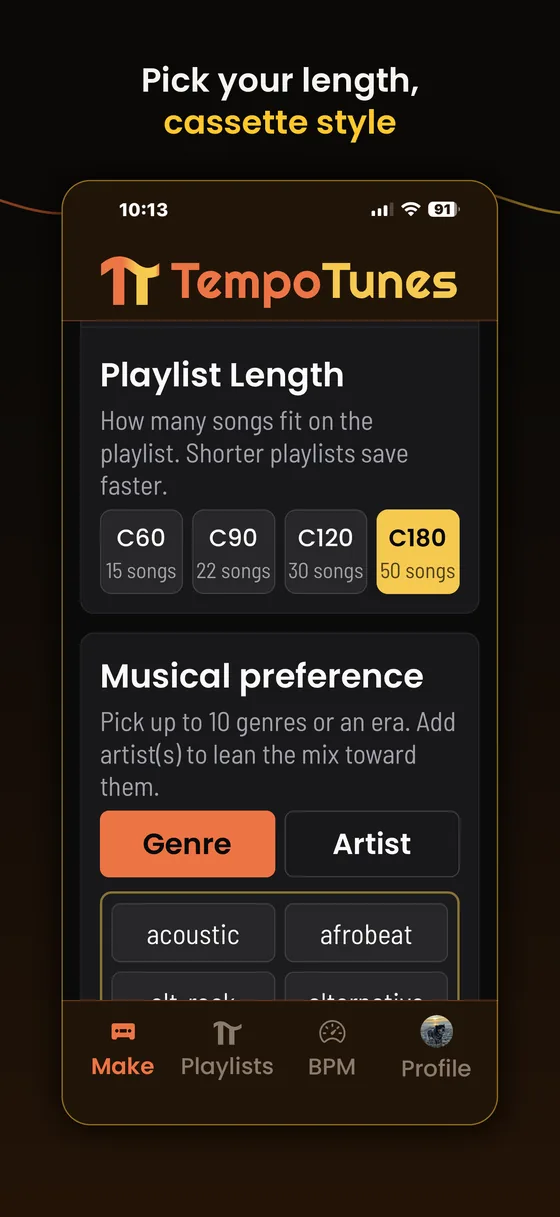
Make · Playlist Length Step 5: Pick your sound
The shelves are always open: tap an era or any genre tile to add it, up to 10. Type in the search field to narrow the shelves, or tap Artist for a playlist of only the acts you name.
Your picks stack up as chips under the field with a count of how many you have used. There is no Done step: keep scrolling and the card follows you. Skip the whole card and you get the full library.
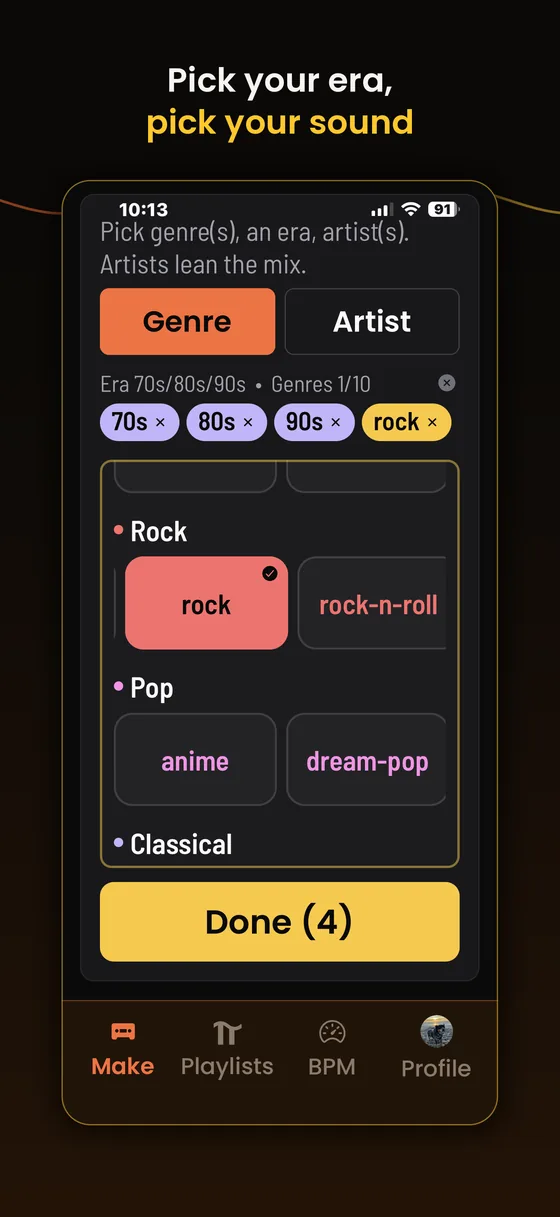
Make · Musical preference Step 6: Lean it toward songs you love
Sounds like takes up to 5 songs you love (optional) and leans the playlist toward their sound. Search any song or artist and tap to pick.
Pick a song outside your BPM range and the app says so: it will still shape the sound, and a one tap Widen chip stretches your tolerance to pull it in. The To my taste slider underneath sets how strongly the playlist matches your picks, Subtle to Strong.
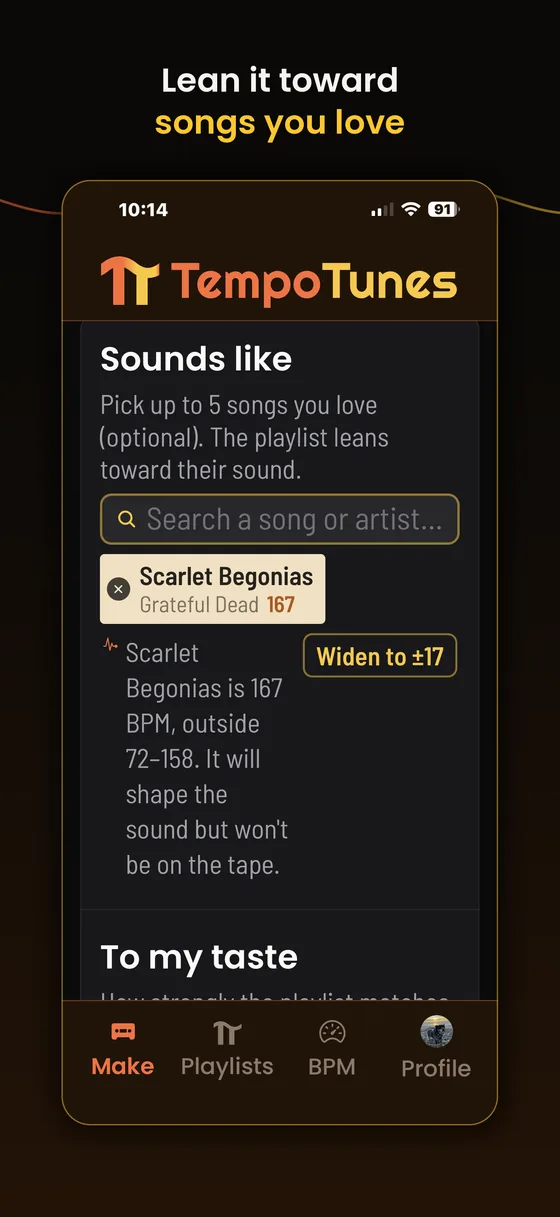
Make · Sounds like Step 7: Name it, then hit Generate
Name your playlist is optional. Leave it and the app names the playlist after its tempo, like Tempo 150→80 BPM.
The line under the button is your recipe read back to you: target, range, length, era, genres, and your Sounds like picks. Check it, then tap Generate playlist.
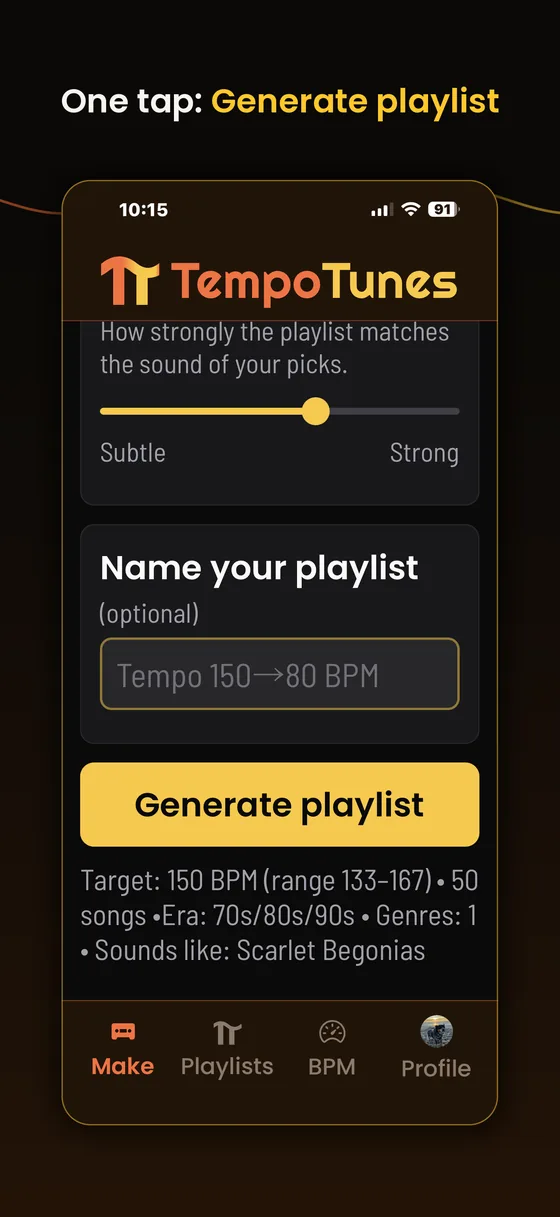
Make · Generate playlist Step 8: Your playlist, built and playing
The playlist arrives as a cassette with its own J-card. Hit play and 30 second previews start rolling, no music account needed.
Every row carries its measured BPM in orange. On this Fade playlist you can watch it work: the list opens at 149 and eases down, because the song order is the curve you picked. The ↗ on a row opens that song in your music service for the full track.
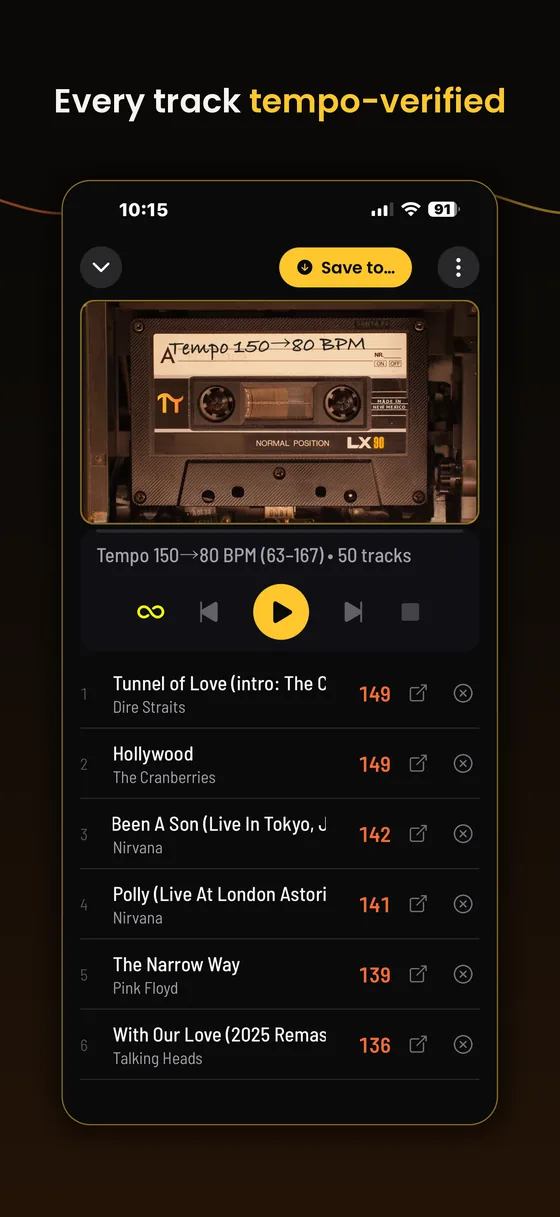
The finished playlist Step 9: It is already on your shelf
Nothing to save first. Tap Playlists in the bottom bar and every playlist you have made is sitting there as a cassette, tempo on the spine, genre and track count on the label.
Tap any one to reopen it, play it, or take it further.
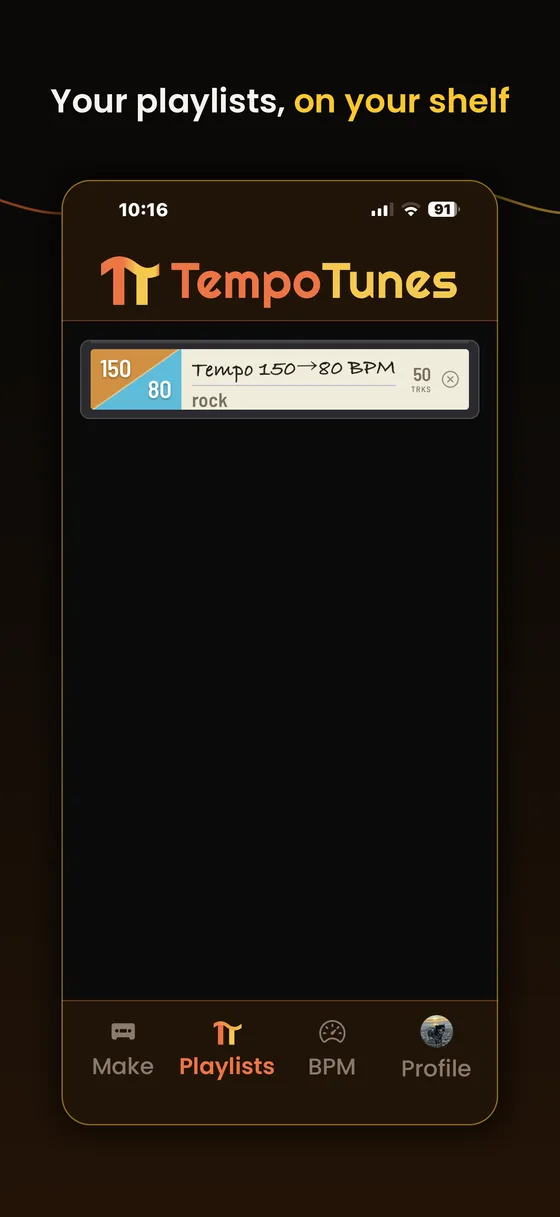
Playlists tab Step 10: Save it into your music app
This is the step people miss. With a playlist open, tap Save to… at the top. The sheet lists Apple Music, Tidal, and YouTube Music, plus Spotify while it is invite gated.
Sign in once when asked and the playlist is built in your own library. Every save is verified: the app confirms the playlist really exists before it says Saved.
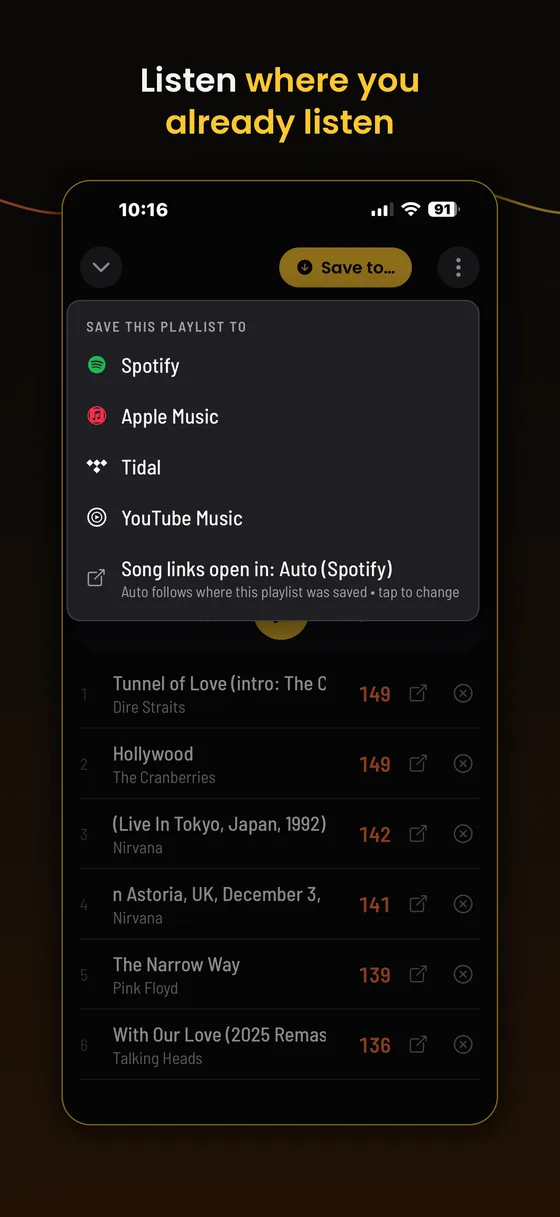
Save to… menu Step 11: Bonus: find any song's BPM
The BPM tab is a tool on its own. Mic a song playing in the room to name it, search any track by title, or drop in a file of your own.
You get its tempo, and that tempo can become your next target. Great for building a playlist around a song you already love.
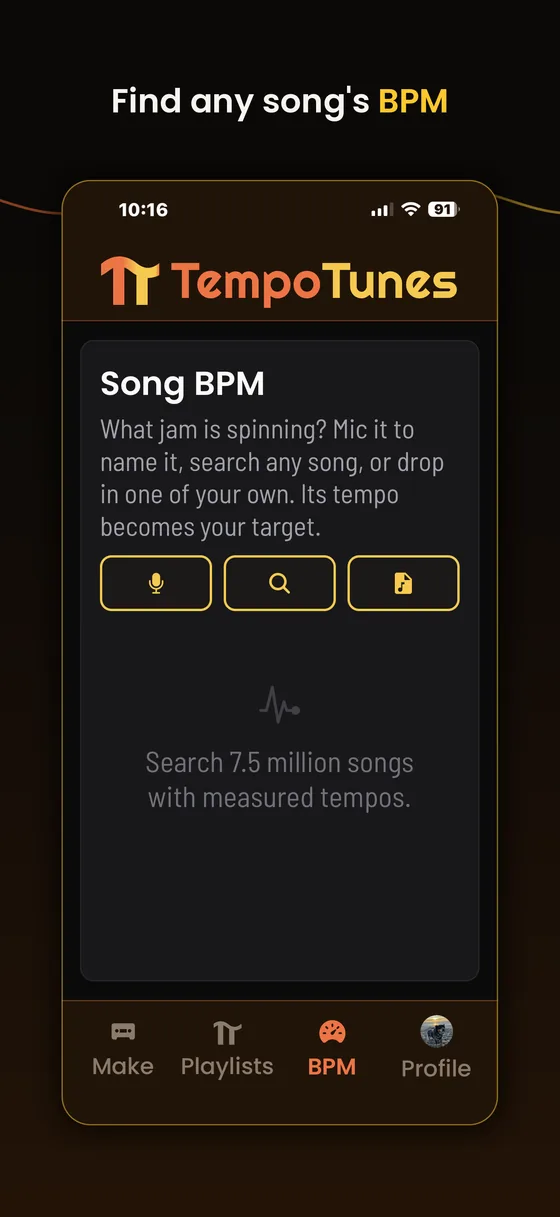
BPM tab
02Every control on the Make screen
Top to bottom, in the order they appear.
- Tempo · Run · Golf · Ride
- The switch at the top. Tempo lets you set the BPM yourself. Run sets it from a distance and a goal time. Golf sets it from your swing. Ride sets it from a ride you recorded, and changes it where the trail does. Live is its own tab on iPhone: no target at all, your watch picks each song as you go.
- Target Tempo
- The BPM every song aims for. Step it, drag it, or nudge it. If you know your cadence or your class pace, start there.
- Tempo shape
- Steady, Rise, Bell, or Fade. Anything but Steady turns the single tempo into a start and an end (a start and a peak, for Bell) and draws the curve between them.
- Tolerance (±)
- Wiggle room around the target, 0 to 30 BPM, stepping by 2. It starts at ±8, which is comfortable. Tighten to ±2 or ±3 for dance practice or interval work. On a shaped playlist the range follows the curve the whole way along.
- Obscure or Popular
- The taste slider. Toward Popular you get songs people can sing along to. Toward Obscure it digs up deep cuts at the same tempo that nobody else is playing. Center blends both. Same tempo, two different worlds.
- Playlist Length
- How many songs fit on the playlist, cassette style. Shorter playlists save faster.C60 · 15 songsC90 · 22 songsC120 · 30 songsC180 · 50 songs
- Musical preference
- Genre picks up to 10 at once: Rock, Electronic, Hip-Hop, Country, Soul & Jazz, Classical, Chill, and more. Artist is exact: pick Grateful Dead and every song is Grateful Dead, pick two artists and they share the playlist evenly. A genre or era picked alongside narrows them to those songs.
- Era
- Pin one or more decades, 1940s through 2020s. An era pick is a hard filter that ANDs with everything else, so 80s rock at 120 means all three at once. Leave it alone for all decades.
- Sounds like
- Pick up to 5 songs you love (optional) and the playlist leans toward their sound. A pick outside your BPM range still shapes the sound, and a one tap Widen chip stretches the tolerance to pull it in.
- To my taste
- How strongly the playlist matches the sound of your Sounds like picks, from Subtle to Strong.
- Name your playlist
- Optional. Skip it and the playlist is named after its tempo.
- Make playlist public
- Off by default. Flip it on if you want the playlist shareable with the world.
03Tempo Shapes: playlists that move
A steady playlist holds one tempo start to finish. A shaped playlist moves. Pick a shape and a second tempo, and the playlist orders itself along the curve. You saw all four in step 2.
Shapes work on iPhone, Android, and the web. A shaped playlist opens and plays anywhere, curve order intact.
04Run: a playlist for your race
At the top of Target Tempo sits a switch: Tempo, Run, Golf, Ride. Tempo is where you set the BPM yourself. Run sets it for you, from the run you are training for.
Step 1: Tap Run, then tell it your goal
Enter a distance, a goal time, and your height. Tempo Tunes works out your pace, then the steps per minute that carry it. Music locks to your feet, not to the mile markers, so steps are the number that matters.
One beat per step becomes the playlist BPM. The playlist is sized to your goal time with a song to spare, so the music never runs out before you do.
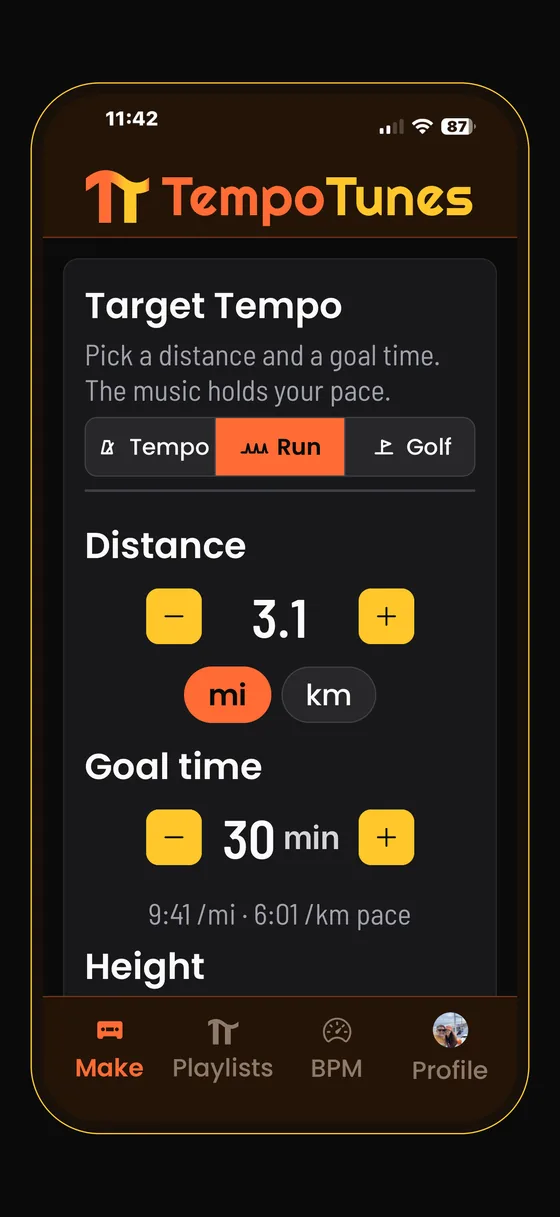
Make · Run
- Distance
- Miles or kilometers. Tap a unit to switch, and the number converts with it.
- Goal time
- Starts at a typical time for your distance. Set your own and the pace underneath updates as you go.
- Height
- Sets your stride. Taller means longer strides and fewer steps at the same pace.
- Steps per minute
- Our suggestion for your pace and height. If your watch reports your cadence on a normal run, nudge this to match it. Trust the watch.
- Half time
- A beat on every other step. 172 steps per minute becomes an 86 BPM playlist. It locks just as well and roughly doubles the songs that can hold your pace.
- Tolerance and length
- Set for you in Run mode. Every song stays within a step-feel of your pace, and the length follows your goal time.
05Golf: a playlist for your swing
Good golf swings share a rhythm. Tour players take about three times as long going back as coming down, a 3 to 1 tempo, and putting runs closer to 2 to 1. Count it as three beats back and one beat down, and impact lands on the beat. Golf mode finds the BPM where that count fits your swing, then builds the playlist there.
Step 1: Tap Golf and pick your stroke
Choose Full swing or Putting. Then pick a way in. Only the one you choose opens, so the screen stays simple.
Presets are the quick way. Tap a style and its tempo is typed in for you: Quick 150, Tour 129, or Smooth 113 for a full swing, and Brisk 100, Classic 90, or Slow 80 for putting. Nudge the number to taste.
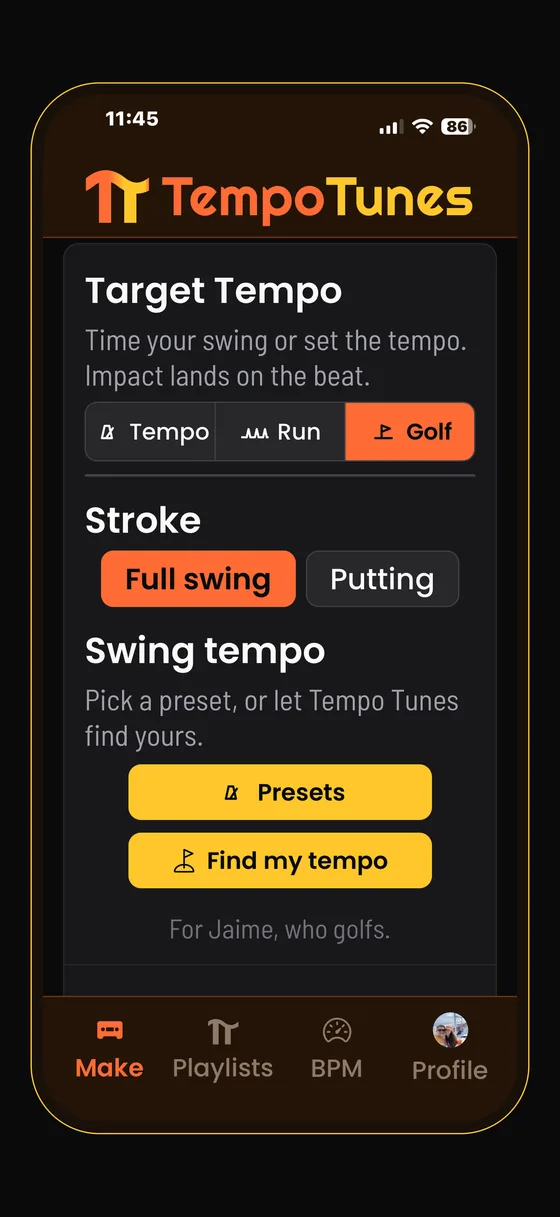
Make · Golf Step 2: Or find your own tempo
Find my tempo times your real swing. Take three swings and Tempo Tunes averages them. Clear some space around you first.
The results page shows your three swings, how alike they were, your ratio next to the Tour number, and where your tempo sits between the styles. Then it sets your BPM.
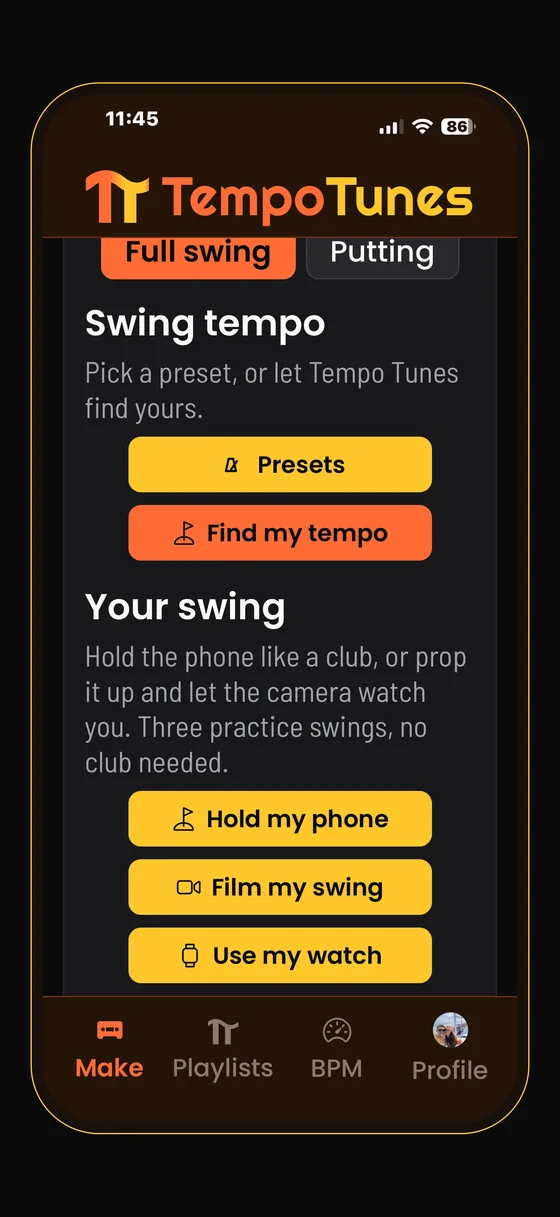
Make · Golf · Find my tempo
- Hold my phone
- Hold the phone in both hands like a grip, screen facing you, and take three practice swings. No club needed. Hold on tight.
- Film my swing
- Prop the phone up facing you and step back until your whole body is in the box. Icons tell you when you are out of frame, when it is ready, and when a swing counted. A real club is fine. Nothing is recorded: the video stays on your device. Works on the web too, with your computer's camera.
- Use my watch
- Apple Watch or Wear OS, on your lead wrist, with a real club. The watch counts each swing and taps your wrist, and the tempo lands on both screens. It works with your phone in your pocket.
- Enter my numbers
- Already timed by a Garmin or another swing trainer? Type in the backswing and downswing times it gives you. The tempo shown should match the one on your watch.
- Tolerance
- Set for you in Golf mode, and kept tight. Every song stays close to your swing.
From here it is the same app: pick your genres, generate, listen, save. Play it on the range, in the net, or on the putting green, and let the beat count the swing for you.
06Ride: a playlist that follows the trail
A ride is not one tempo. You grind up, you cruise the flat, you fly down. Ride mode reads a ride you have already recorded and gives each part its own tempo, in order, so the playlist changes where the trail does.
Step 1: Tap Ride and load a ride
A .fit, .gpx or .tcx from Garmin, Wahoo, Strava, Komoot, Ride with GPS, or most apps that record a ride. Garmin's Export File zip and Strava's bulk-export files work as they are. The file is read on your device and never uploaded.
Tempo Tunes smooths the altitude, works out the grade, and splits the ride into climbs, cruising and descents. The strip shows the profile with the tempo written on each part. Then it builds one playlist that runs the whole ride in order, sized to the time you recorded.
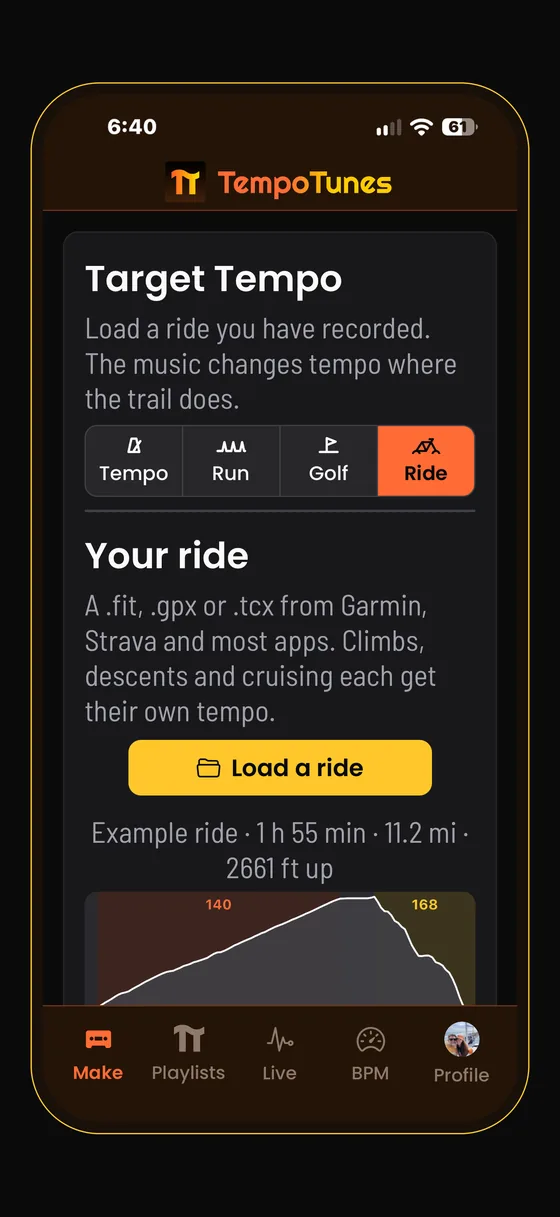
Make · Ride
- Climb
- Grades over 3 percent, for three minutes or more. Default 140 BPM: a seated climb turns the cranks 65 to 75 times a minute, and doubled the music lands on every pedal stroke.
- Cruise
- Flat and rolling terrain, and every stop. Default 110 BPM, easy and in the pocket, so nothing is racing while you are not.
- Descent
- Grades under minus 3 percent, for three minutes or more. Default 168 BPM: your legs are barely turning, so the beat follows the speed instead.
- Three dials
- Each band has its own dial from 60 to 200 BPM. The trail decides when the tempo changes; you decide what it changes to.
- Rollers
- Stretches shorter than three minutes fold into their neighbor, so the playlist never flips tempo for a single bump.
07Live: your watch picks the next song
Everything else in this manual builds a playlist before you move. Live builds it while you move. Your Apple Watch streams your heart rate and your steps to the phone, and about thirty seconds before each song ends the phone picks the next one at the tempo your body is asking for. Live is the center tab on iPhone, and it plays full songs through Apple Music.
Step 1: Pick an activity and a goal
All day is the default: music that flows with your day, resting when you sit and picking up your steps when you walk. Walk puts one beat on every step and Run one on every stride. Bike lets the road set the tempo from the watch's GPS and barometer. Snow, for splitboards, touring skis and resort days, arrives in the next update.
Then a goal. Steady follows your body and nothing else. Zone 2 keeps your heart in the easy aerobic range, 60 to 70 percent of your max, and Push aims higher. The music comes from any playlist you have made, its genres, eras and artists, or from the whole library.
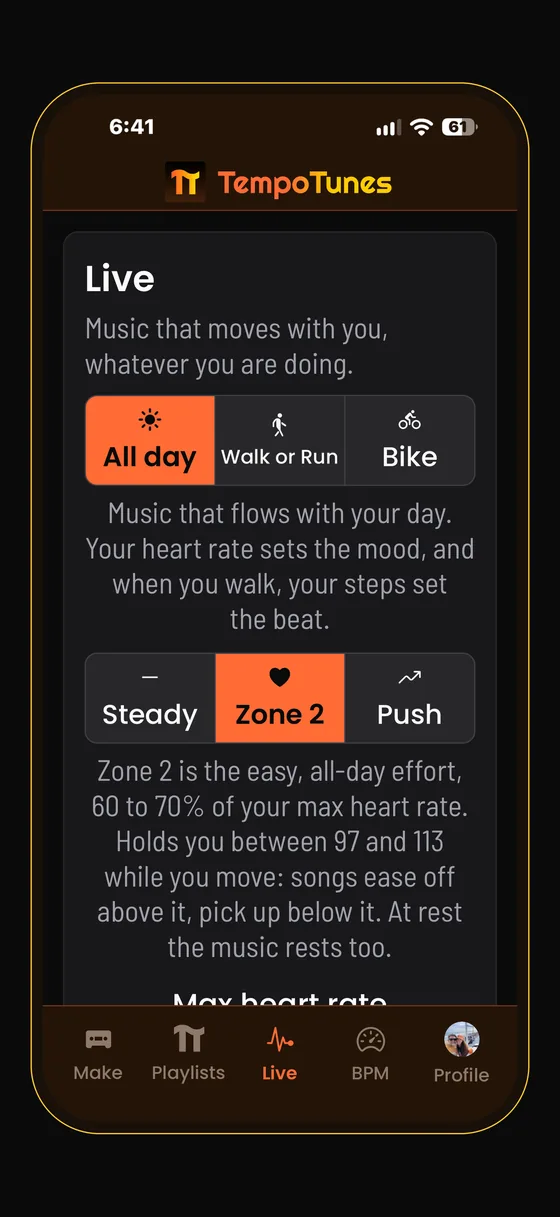
Live · setup Step 2: Tap Start and put the phone away
Start from the phone or the watch, like any workout. The card shows the song, its BPM, a bar with the orange tick where the next pick happens, and a line that says why the tempo is where it is. Your watch shows the same session.
When you end, the summary shows minutes, steps, average heart rate and how long you stayed in your zone, with a chart of song tempo against your steps. Save as playlist keeps the songs. A walk or a ride is saved to Health; an All day session is not.
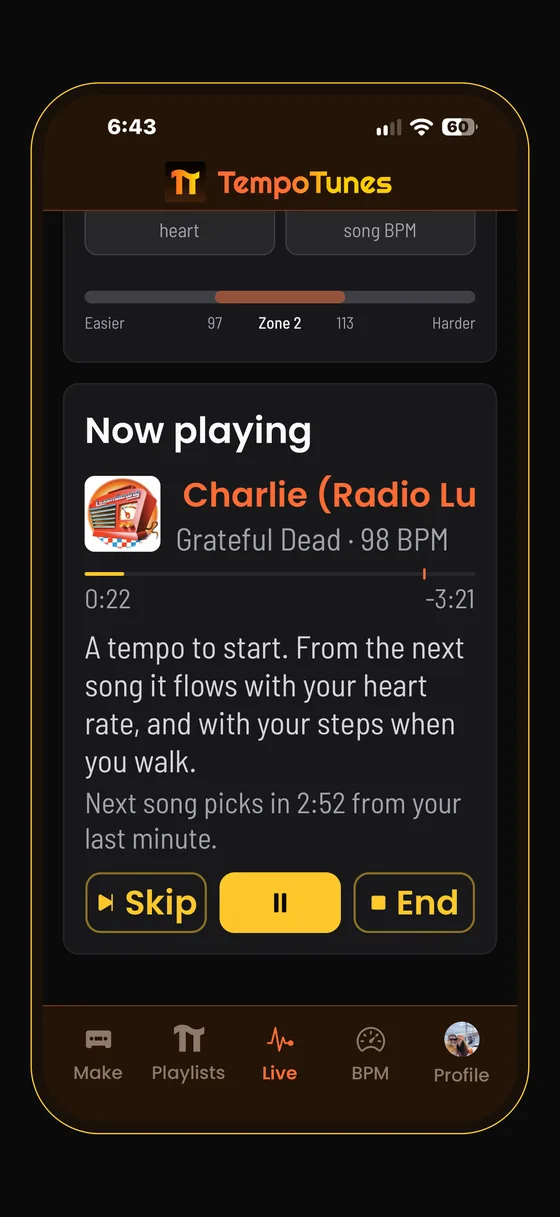
Live · playing
- On foot
- One beat per step, from your steps per minute over the last minute. With a zone set, above it the next song is a few BPM slower; below it, a few faster.
- On a bike
- The grade sets the band: a climb sits on the doubled pedal stroke, 130 to 142, rolling sits around 140, a descent follows the speed around 168. Speed nudges inside the band and your zone corrects on top.
- At rest
- No steps for a minute counts as rest, whatever your goal. The tempo follows your heart rate alone, from the bottom of the library at your resting rate up to about 130, and comes down at most 15 BPM a song.
- Skip
- Skip inside the first 45 seconds and the next pick leans 5 BPM the other way, once. Every pick is a song you have not heard this session, from an artist you have not heard in the last three.
- Max heart rate
- Set it yourself, or Tempo Tunes takes it from your age in Health. Your resting rate comes from Health too, and sets the floor for resting music.
- What it needs
- An iPhone, an Apple Watch with Tempo Tunes installed from the Watch app, and an Apple Music subscription. No cadence sensor, no chest strap. Bike uses GPS, which costs more battery than heart rate alone.
08Listening in the app
Every playlist plays 30 second previews right in the app, no music account needed. The cassette deck spins, the counter rolls, and you can skim the whole playlist before saving a thing. The loop button at the left of the transport row repeats the playlist.
Songs without a preview show a small note in their row. Use the ↗ button on any song to open it in your music service and hear the full thing.
09Saving to your music app
Step 10 of the walkthrough, in full. The playlists you make here can live in your own music library.
Open a playlist and tap Save to… at the top of the screen. Under Save this playlist to you will see:
Apple MusicTidalYouTube MusicSpotify · invite gated for now
Pick a service, sign in to it once when asked, and the playlist is created in your library on that service. Every save is verified: the app confirms the playlist actually exists in your library before it ever says Saved. Once a playlist is saved, that row turns into Open in Apple Music, Open in Tidal, or Open in YouTube Music so you can jump straight to it.
Apple Music notes
Apple Music can take a minute to sync a new playlist. Look under Library → Playlists, and close and reopen the Music app if it has not appeared yet. If a save ever fails you get a clear error, and a Save to Apple Music again option lives right in the same menu.
Where do song links open?
The ↗ button on each song follows the service the playlist was saved to. Saved to Apple Music? Links open Apple Music. Want it fixed to one service always? Use Song links open in at the bottom of the save menu and tap to cycle: Auto, Apple Music, Tidal, YouTube Music, Spotify.
About Spotify
Spotify support is built and working, but Spotify reserves full access for apps that reach 250,000 monthly active users, so Spotify saves are invite gated for now. Apple Music, Tidal, and YouTube Music work for everyone today. Every person who joins moves us toward that number, and hitting it unlocks the door to Spotify for everybody.
10Editing, refilling, remixing
Open a playlist from your shelf. Per song controls sit on each row, and the rest live behind the ⋯ menu at the top.
- Remove a song
- Tap the remove control on any row. Removed songs are remembered, and a refill never brings them back.
- Refill playlist
- Tops the playlist back up to its intended length with fresh songs at your tempo. Your own songs all stay. New arrivals wear a NEW tag until you next close the playlist.
- Remix
- Reopens the playlist's recipe on the Make screen so you can tweak the tempo, genres, or slider and generate a fresh take.
- Share
- Sends a link with the tracklist so anyone can see the playlist, even without the app.
- Sort
- Tap the sort pill to cycle Newest, A to Z, Z to A, BPM up, BPM down. Shaped playlists have no sort pill, because the order is the curve.
- Delete
- Removes the playlist from your shelf. It sits at the bottom of the same ⋯ menu.
11Why the BPM is right
Public BPM data is famously messy: half-time and double-time confusion, 6/8 songs logged at twice their felt tempo, live takes that drift. Tempo Tunes runs on its own database of 2M+ tempo-verified tracks and growing, and tracks are re-verified by audio analysis with a vote across independent methods before they count as verified. Genre-aware tempo ranges catch the octave errors that trip up most databases.
That is why every row in a playlist can show its BPM in the open. Spot one that looks wrong anyway? Remove it and it stays gone. Better yet, tell us, because every report makes the library sharper.
Curious about a single song? That is the BPM tab from step 11. It looks up any track's tempo on its own, no playlist required.
12FAQ
Is it free?
Yes. Free, no ads. Built by one person who wanted it to exist.
Do I need Spotify?
No. Building and playing playlists needs no account at all, and saves work with Apple Music, Tidal, and YouTube Music today.
I saved to Apple Music and do not see the playlist.
Give it a minute and check Library → Playlists, then close and reopen the Music app. Still missing? Use Save to Apple Music again from the playlist menu. Saves are verified now, so a success message means the playlist really is there.
Will I get songs by artists I did not pick?
No. Artist picks are exact: pick one artist and every song is theirs, pick two and they share the playlist. A genre or era picked alongside narrows them to those songs. If nothing fits your tempo, you are told what to adjust instead of getting other acts.
I do not see Run, Golf, Ride or Live in my app.
Update Tempo Tunes from the App Store or Google Play. New features land often, and the web app always has the latest.
Does Film my swing record me?
No. It follows your body position live, on your device, to time the swing. No photo or video is recorded, stored, or uploaded.
Can it import or re-order my existing playlists?
Not yet. It is the most requested feature and it is on the roadmap.
What platforms does it run on?
iPhone, Android, and right here on the web. Same playlists, same cassette soul. Golf mode also has a watch app for Apple Watch and Wear OS, and Live runs on iPhone with Apple Watch (Wear OS is next).
Why cassettes?
The whole app is styled after old school cassettes, J-cards included, in a throwback brown and gold. It started with a childhood yellow Sony Sports Walkman and never really ended.